
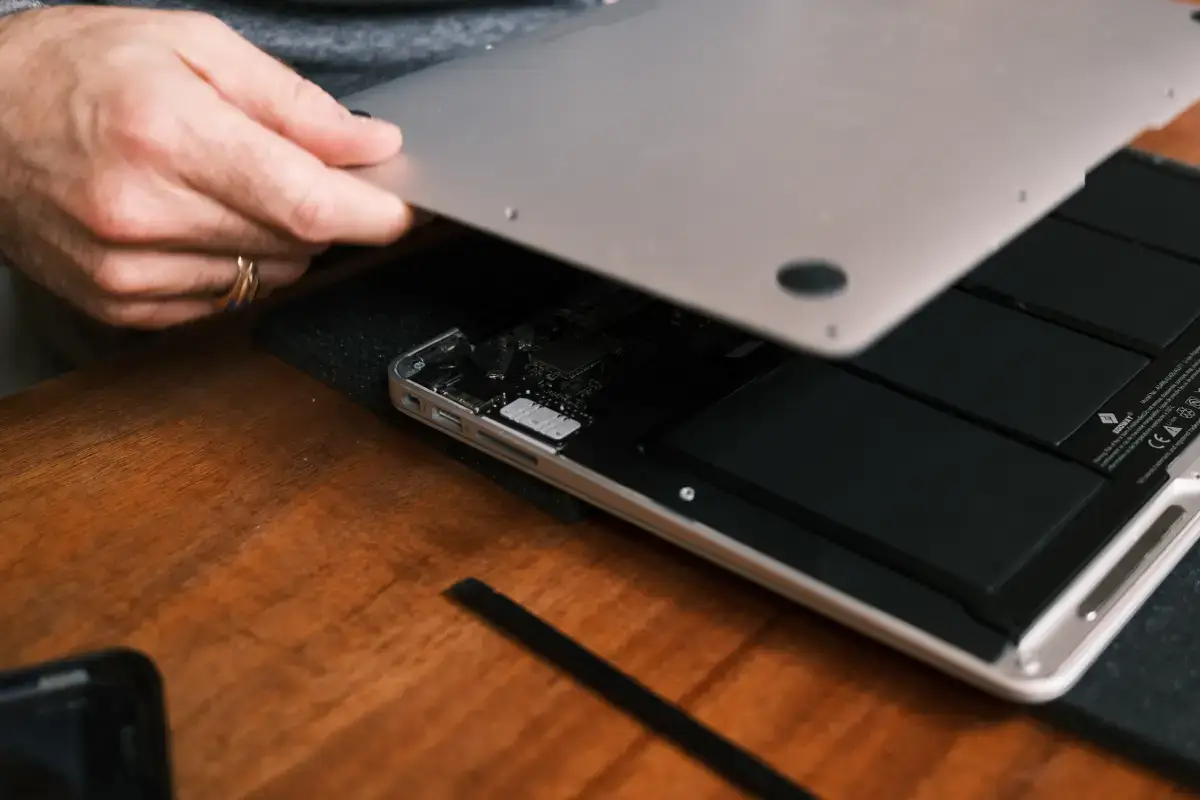
A MacBook can feel like the perfect workhorse until something goes wrong. Maybe it will not charge. Maybe the screen stays black. Maybe the keyboard is acting up, the battery drains too quickly, or the laptop was exposed to water. When that happens, it is tempting to search for a quick video, order a cheap part, and try to fix it at home.
The problem is that modern MacBooks are not built like older laptops. Many newer MacBook Air and MacBook Pro models use tightly packed parts, glued batteries, small internal connectors, advanced security features, and delicate boards. A simple-looking repair can quickly turn into a bigger issue if the wrong part is removed, the wrong screw goes in the wrong place, or a tiny cable gets damaged.
If you are looking for MacBook repair in Toronto, Profix Cell offers professional help from one convenient East York location at 1281 Gerrard St E, Toronto, ON M4L 1Y5. Customers in Toronto and the GTA can stop by the shop or use mail-in repair. Customers outside the Greater Toronto Area can use the mail-in option for a practical repair process without travelling to Toronto.

Why DIY MacBook Repairs Are Riskier Than They Look
One small mistake can damage a cable, battery, screen connector, trackpad, keyboard, charging port, or logic board. The logic board is the main internal board that connects and controls major parts of the MacBook. Think of it as the laptop’s command centre. If it gets damaged, the repair can become more expensive and more complicated.
DIY repairs usually fail because people underestimate how precise modern MacBook repair has become. It is not just about having the right screwdriver. It is about knowing what to test, what not to touch, and how to avoid turning one problem into three.
What Changed in Modern MacBook Repairs?
Older laptops were often easier to open and upgrade. You could replace memory, swap a hard drive, or remove a battery with fewer risks. Many newer MacBooks are different. Parts are smaller, thinner, and harder to separate.
Apple’s repair and service information explains that repair coverage and service options depend on the product and situation. That is a good reminder that MacBook repairs are not one-size-fits-all. Different models, years, and types of damage require different repair paths.
| MacBook Feature | Plain-English Explanation | Why DIY Repair Can Go Wrong |
|---|---|---|
| Soldered storage and memory | Some parts are attached directly to the main board instead of being removable. | You cannot always swap them like older laptop parts. |
| Thin internal cables | Small flexible strips connect parts like the screen, keyboard, and trackpad. | They can tear or bend if pulled the wrong way. |
| Glued batteries | The battery may be strongly attached inside the laptop. | Removing it carelessly can damage parts or create a safety risk. |
| Advanced security features | Some Macs include security systems that protect data and hardware functions. | The wrong repair approach can create data or startup issues. |
The Biggest DIY MacBook Repair Mistakes
Many failed DIY repairs begin with good intentions. The owner wants to save money, avoid downtime, or fix the issue quickly. The issue is that MacBook symptoms can be misleading. A charging problem may not be the charger. A black screen may not be the display. A dead MacBook may not be a battery issue.
1. Replacing Parts Before Proper Diagnosis
Diagnosis means finding the real cause of the problem before replacing anything. Without diagnosis, you are guessing. For example, if your MacBook will not charge, the problem could be the charger, charging port, battery, internal cable, power chip, liquid damage, or logic board.
A DIY repair often starts with the cheapest visible part. But if that part is not the real issue, the MacBook still does not work and the money is already spent.
2. Using Cheap or Wrong Parts
Not all replacement parts are equal. Some parts may fit physically but perform poorly. A low-quality battery may drain quickly. A poor-quality screen may have weak brightness, colour issues, or connection problems. A cheap charger can also create charging instability.
A professional repair shop checks part quality and compatibility before installation. Compatibility means the part is suitable for that exact MacBook model.
3. Damaging Small Connectors
Inside a MacBook, small connectors hold delicate cables in place. These connectors are easy to break if lifted, pulled, or pressed incorrectly. Once damaged, the original problem becomes worse.
This is one reason professional MacBook repair in Toronto is often safer than trying to learn on your own device. Your MacBook is not the place to experiment. Big main-character energy, but expensive.
4. Losing Screws or Mixing Them Up
MacBooks use different screw sizes. Some look almost identical but are not interchangeable. If a longer screw goes into the wrong place, it can damage the board or casing.
This mistake is common because DIY videos rarely show how carefully screws must be organized during the repair.

MacBook Battery Repairs Need Extra Care
A battery replacement sounds simple, but it is one of the repairs that should be handled carefully. MacBook batteries store a lot of energy in a thin space. If the battery is swollen, punctured, bent, or removed the wrong way, it can become unsafe.
A swollen battery may push against the trackpad, keyboard, or bottom case. You might notice the MacBook does not sit flat, the trackpad feels stiff, or the case looks slightly raised. If you see those signs, stop using the device and have it inspected.
| Battery Symptom | What It Could Mean | What to Do |
|---|---|---|
| MacBook dies quickly | The battery may be worn out or not holding charge. | Get a battery health check before replacing parts. |
| Trackpad feels hard to click | The battery may be swelling underneath. | Stop using the MacBook and bring it in for inspection. |
| MacBook only works when plugged in | The battery may no longer power the device properly. | Have the battery and charging system tested. |
Liquid Damage Is Where DIY Repairs Usually Go Sideways
Water, coffee, tea, juice, and other liquids can create hidden damage inside a MacBook. Even if the device turns on after a spill, liquid can leave residue behind. Residue means leftover material from the liquid after it dries. That residue can slowly affect small parts inside the MacBook.
The worst move after a spill is to keep using the laptop like nothing happened. The second worst move is trying to open it and clean it without the right tools. Liquid damage repair often requires careful inspection, cleaning, and testing.
If the MacBook was exposed to liquid and now has power issues, charging problems, keyboard problems, screen flickering, or no startup, the issue may be deeper than a simple part replacement. In some cases, Profix Cell may recommend micro soldering repair. Micro soldering means repairing very tiny parts on the main board under magnification. In simple words, it is used when the issue is inside the board, not just with an outside part.
Why “MacBook Won’t Turn On” Does Not Always Mean the Same Thing
One of the most common MacBook repair questions is simple: “Why won’t my MacBook turn on?” The answer is not always simple.
A MacBook that will not turn on could have a battery problem, screen problem, charging problem, keyboard power button problem, software issue, liquid damage, or board-level failure. Board-level means the issue is on the main internal board rather than a removable outside part.
| Symptom | Possible Cause | Why Diagnosis Matters |
|---|---|---|
| No power at all | Battery, charger, port, internal cable, or logic board issue. | Replacing one random part may not solve the real problem. |
| Black screen but keyboard lights up | Display, cable, backlight, or graphics-related issue. | The MacBook may be on, but not showing an image. |
| Turns on, then shuts off | Battery, overheating, software, or internal hardware issue. | Testing prevents unnecessary part replacement. |
Data Protection Should Come Before Repair
Your MacBook may contain work files, school documents, family photos, business records, passwords, tax documents, and private messages. Before any repair, data protection should be part of the conversation.
Apple’s support guidance explains that backing up your Mac is important before erasing, selling, giving away, or transferring a device. The same logic applies before major repair whenever the MacBook still turns on. A backup means you have a copy of your files saved somewhere else, such as iCloud, an external drive, or another secure backup location.
Before Bringing Your MacBook for Repair
- Back up your files if the MacBook still turns on.
- Write down the symptoms you noticed before the device failed.
- Bring the charger if the issue may be related to charging.
- Do not share your Apple Account password unless absolutely necessary.
- Let the technician know if the device was dropped or exposed to liquid.
If your MacBook does not turn on, do not keep trying to force it. Bring it in for inspection so the repair can start with a proper diagnosis.
When a MacBook Screen Repair Needs a Professional
MacBook screen problems are another area where DIY repairs can get expensive fast. A cracked display, flickering screen, dim image, black screen, or lines across the display may look like a simple screen replacement. But sometimes the issue is the screen, and sometimes it is the cable, backlight, board, or another internal connection.
Backlight means the lighting that helps the screen image appear bright. If the backlight fails, the screen may look black even when the MacBook is technically on.
Screen work requires careful handling because the display assembly is thin and connected through delicate cables. Pulling too hard or using the wrong tool can damage the new screen or the MacBook itself.

Toronto Customers Have Two Repair Options: Stop By or Mail In
Profix Cell has one physical location in East York. For customers in Toronto and the GTA, visiting the shop is often the fastest option. For customers outside the GTA, mail-in repair is usually the best fit.
This is especially helpful for customers who need MacBook repair but do not want to risk a DIY attempt. Whether you are near East York or sending your device from outside Toronto, the repair process starts with understanding the problem properly.
| Customer Location | Best Option | Why It Makes Sense |
|---|---|---|
| East York, Leslieville, Riverdale, The Beaches, Danforth | Stop by the shop | Convenient access to the East York location. |
| Toronto and the GTA | Stop by or mail in | Flexible option based on schedule and distance. |
| Outside the Greater Toronto Area | Mail-in repair | No need to travel into Toronto for professional repair support. |
What a Good MacBook Repair Technician Should Check
A good repair process starts before any part is replaced. The technician should inspect the device, test the symptoms, and explain the likely repair path. That matters because MacBook repairs can involve more than one possible cause.
A Proper MacBook Diagnostic May Include:
- Power and charging tests.
- Battery health review.
- Screen and display inspection.
- Keyboard and trackpad testing.
- Liquid damage inspection.
- Internal connector review.
- Logic board testing when needed.
The goal is to avoid guessing. Guessing wastes time, money, and parts. Proper diagnosis gives you a clearer repair decision.
What About iMac, Mac Mini, iPad, iPhone, and Samsung Repairs?
Many customers do not rely on only one device. A MacBook may be your main work laptop, but your household or business may also use an iPhone, iPad, iMac, Mac Mini, or Samsung phone every day.
If your desktop Apple device needs help, Profix Cell also offers iMac repair and Mac Mini. These devices can have power, display, storage, startup, and performance issues that also need careful diagnosis.
If your Apple repair needs go beyond your laptop, the shop also handles iPhone repair in Toronto and iPad repair. And for mixed-device homes or offices, Profix Cell provides Samsung phone repair as well.
That makes it easier to use one trusted local repair shop instead of searching for a different technician every time another device breaks.
DIY MacBook Repair vs Professional MacBook Repair
DIY repair can make sense for very basic tasks, such as cleaning the outside of the laptop, checking a different charger, restarting the MacBook, or backing up your files. But once the repair involves opening the device, removing glued parts, testing the board, or replacing internal components, the risk increases.
| Repair Task | DIY Risk Level | Recommended Approach |
|---|---|---|
| Trying another charger | Low | Safe first step if using a proper compatible charger. |
| Backing up files | Low | Recommended before repair when the MacBook still works. |
| Battery replacement | High | Professional repair is safer, especially if the battery is swollen. |
| Screen replacement | High | Professional diagnosis and installation are recommended. |
| Liquid damage repair | Very high | Stop using the device and bring it in for inspection. |
| Logic board repair | Very high | Requires board-level tools and specialist experience. |
Local MacBook Repair for East York and Toronto
Profix Cell is based in East York and serves customers from across Toronto and the GTA. Many customers visit from nearby areas because the shop is easy to reach from Toronto’s east end and central neighbourhoods.
- East York
- Leslieville
- The Beaches
- Riverdale
- Danforth and Greektown
- Scarborough
- Downtown Toronto
- North York
- Etobicoke
- Markham, Vaughan, Richmond Hill, and nearby GTA areas
Customers outside the GTA can use mail-in repair. This is a practical option if you need help with a MacBook but cannot visit the East York location in person.
Frequently Asked Questions About MacBook Repair in Toronto
Is it safe to repair a MacBook myself?
It depends on the issue. Basic checks like restarting the MacBook, trying a different charger, or backing up files are safe. Opening the MacBook, removing the battery, replacing the screen, or working near the logic board is much riskier.
Why will my MacBook not charge?
A charging problem can come from the charger, charging cable, port, battery, internal connector, or logic board. A proper diagnostic helps find the real cause before parts are replaced.
Can liquid-damaged MacBooks be repaired?
Sometimes, yes. It depends on the amount of liquid, where it entered, how long the device was used after the spill, and which parts were affected. The best step is to stop using the MacBook and have it inspected as soon as possible.
Can I mail in my MacBook for repair?
Yes. Customers outside the Greater Toronto Area can use the mail-in repair option. GTA customers can also use mail-in repair if visiting the East York shop is not convenient.
Should I back up my MacBook before repair?
Yes, if the MacBook still turns on. Backing up your files helps protect your data before service. If the device does not turn on, avoid forcing it repeatedly and bring it in for diagnosis.
Get a MacBook Repair Quote in Toronto
DIY MacBook repairs can look easy online, but modern MacBooks are delicate, compact, and expensive to repair when something goes wrong. If your MacBook has charging problems, screen damage, battery issues, liquid damage, startup problems, or signs of internal failure, it is better to have it checked before the damage gets worse.
Profix Cell provides MacBook repair support from one East York location for Toronto and GTA customers. Customers outside the GTA can use the mail-in repair option.
Call the shop directly to describe the issue, confirm the best repair option, and ask about the next step.
