
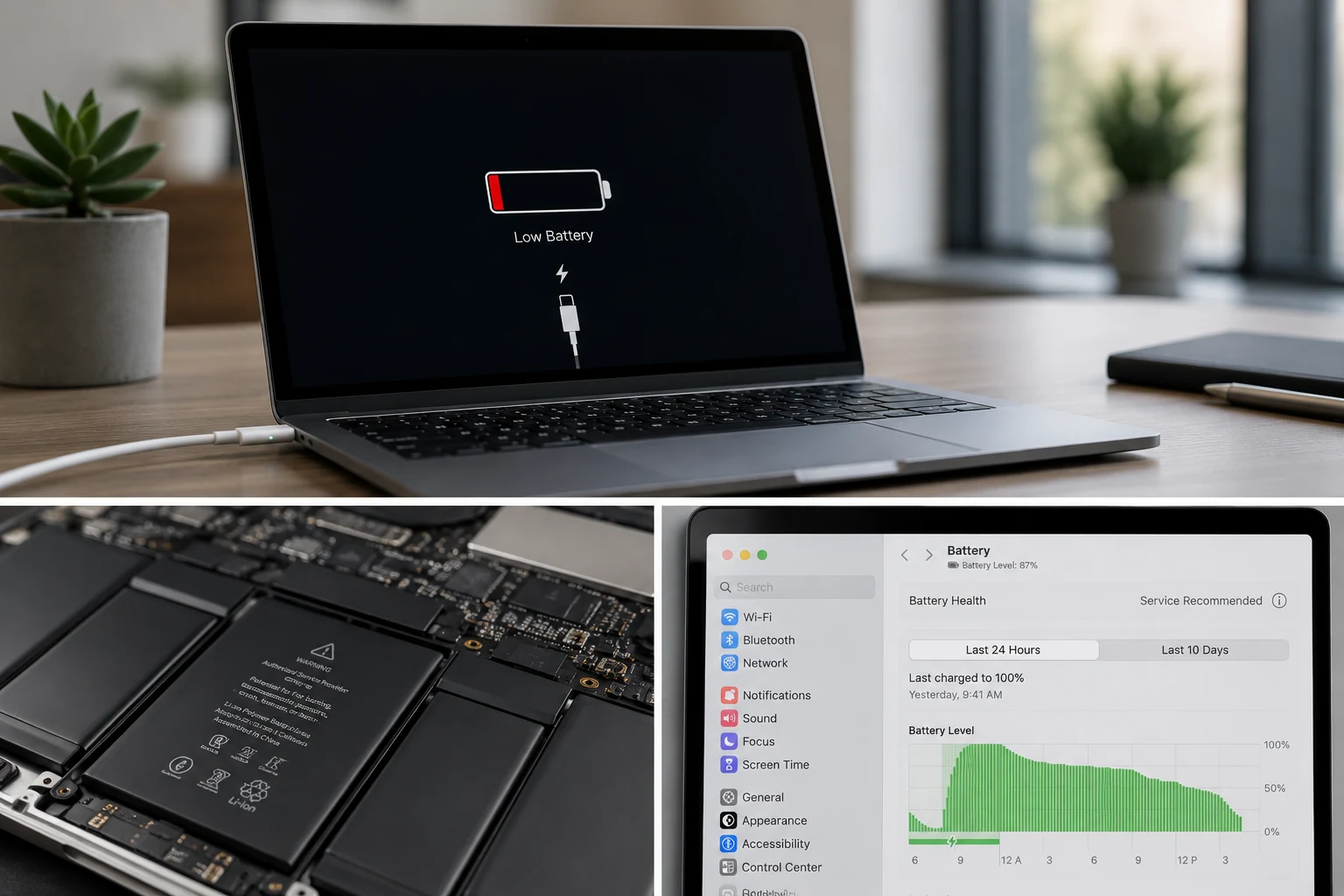
A MacBook battery that drains too fast can make the whole device feel unreliable. You charge it, unplug it, and suddenly the percentage starts dropping like it has somewhere better to be. For students, remote workers, business owners, designers, and everyday users, poor battery life can turn a premium laptop into a desk-only device.
Fast battery drain does not always mean the battery needs to be replaced right away. Sometimes the issue is caused by background apps, display brightness, browser tabs, software updates, battery settings, or heavy usage. Other times, the battery itself may be worn out, swollen, failing, or no longer able to hold enough charge for normal use.
This guide explains why a MacBook battery may drain quickly, how to tell the difference between normal usage and battery failure, what signs suggest replacement may be needed, and when to get the device checked. If your battery life has become unreliable, Profix Cell provides professional MacBook repair in Toronto, including battery replacement, charging issue diagnosis, liquid damage inspection, and related hardware repair.
Common Signs Your MacBook Battery Is Draining Too Fast
Battery drain can show up in more than one way. Some users notice the MacBook loses power quickly after being unplugged. Others notice sudden shutdowns, slow charging, or battery percentage jumps that do not make sense.
| What You Notice | What It Could Mean |
|---|---|
| The battery percentage drops quickly after unplugging | Possible battery wear, heavy app usage, or background activity |
| The MacBook shuts down even with battery remaining | Possible failing battery or incorrect battery reporting |
| The battery jumps from one percentage to another | Possible battery calibration, battery health, or battery sensor issue |
| The MacBook only works well when plugged in | Possible weak battery or internal power issue |
| The battery says “Service Recommended” | Battery may have reduced capacity or may not be functioning normally |
| The MacBook case or trackpad looks raised | Possible swollen battery that should be checked quickly |
The key is consistency. If your battery drains quickly once while running heavy software, that may be normal. If the battery drains quickly every day during basic use, that is a stronger sign something is wrong.
Why MacBook Batteries Drain Faster Over Time
MacBook batteries are rechargeable lithium-ion batteries. They are designed to be used, charged, drained, and recharged many times. Over time, every battery loses some of its ability to hold charge. That is normal battery aging.
Apple explains that MacBook batteries are designed to retain up to 80% of their original capacity at 1000 complete charge cycles under normal conditions. You can read Apple’s battery service and recycling guidance here: Batteries, Service, and Recycling.
A charge cycle does not always mean charging from 0% to 100% in one sitting. It refers to using an amount of battery equal to 100% of its capacity. For example, using 50% one day and 50% the next can count as one complete cycle.
As the battery ages, you may notice shorter battery life, slower charging, random shutdowns, or a need to keep the MacBook plugged in more often. At first, it may only feel slightly annoying. Eventually, it can affect how usable the laptop feels day to day.
How to Check Battery Health on a MacBook
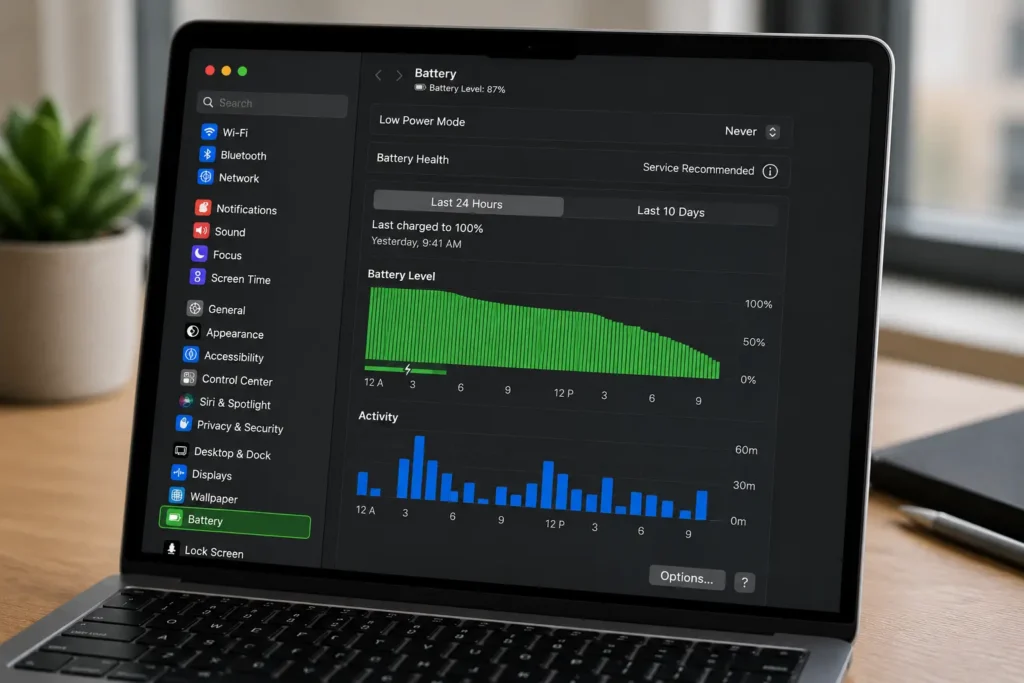
Before replacing the battery, check what macOS says about battery condition. Apple provides a built-in way to check battery health through System Settings. You can review Apple’s instructions here: Check the condition of your Mac laptop’s battery.
On many newer versions of macOS, you can check battery condition by going to:
- Apple menu
- System Settings
- Battery
- Battery Health
You may see a condition such as “Normal” or “Service Recommended.” Normal means the battery is functioning as expected. Service Recommended means the battery may have reduced capacity or may not be functioning normally.
What “Service Recommended” Means
A “Service Recommended” message does not always mean the MacBook will stop working immediately. Apple notes that users can continue using the Mac, but if reduced charging capacity is affecting the experience, service can be requested. You can read Apple’s guidance here: If you see battery Service Recommended on your Mac laptop.
In real life, the message usually means one thing: the battery is no longer performing the way it should. If you also notice fast drain, shutdowns, slow charging, or the laptop only working well while plugged in, it may be time to consider MacBook battery replacement.
How to Check the Battery Cycle Count
Battery cycle count is another useful clue. It tells you how many complete charge cycles the battery has gone through. A high cycle count does not automatically mean the battery is bad, and a low cycle count does not guarantee the battery is healthy, but it is still helpful context.
Apple explains how to find your MacBook battery cycle count through System Information. You can review Apple’s instructions here: Determine battery cycle count for Mac laptops.
In general, a higher cycle count means the battery has been used more. But battery health also depends on age, heat, charging habits, usage patterns, and whether the battery has been damaged.
| Battery Clue | What It Suggests | What to Do Next |
|---|---|---|
| Low cycle count and normal battery health | The battery may still be fine | Check apps, settings, and background activity |
| High cycle count and poor battery life | The battery may be worn down | Consider professional battery diagnosis |
| Service Recommended message | The battery may have reduced capacity or a performance issue | Get the battery checked if performance is affected |
| Sudden shutdowns | The battery may not be delivering stable power | Stop relying on battery power and get it inspected |
| Swollen battery signs | The battery may be physically expanding | Stop using the MacBook and get it checked quickly |
When Fast Battery Drain Is Normal
Not every fast-draining MacBook battery is failing. Sometimes the MacBook is simply working hard. Heavy tasks use more power, especially when the screen is bright, multiple apps are open, or the processor is under pressure.
Battery drain may be normal if you are doing things like:
- Video editing
- Photo editing
- Gaming
- Using multiple external displays
- Running design or engineering software
- Keeping dozens of browser tabs open
- Using video calls for long periods
- Working with high screen brightness
Apple’s Activity Monitor can help show which apps and processes are using energy. Apple explains that the Energy pane in Activity Monitor lets users monitor energy use and see details about each app’s energy impact. You can review Apple’s guide here: View energy consumption in Activity Monitor on Mac.
If one app is using a lot of energy, quitting it may improve battery life. If the battery drains quickly even with basic apps open, low brightness, and no heavy tasks, the battery itself may be the problem.
When Fast Battery Drain Is Not Normal
Fast battery drain becomes more concerning when it happens during normal everyday use. If you are only browsing, writing emails, watching short videos, or using basic apps, the battery should not drop dramatically in a short time.
Signs the Battery May Be Failing
- The battery loses charge quickly during light use.
- The MacBook shuts down without warning.
- The battery percentage jumps around.
- The MacBook gets unusually warm while charging.
- The laptop only works reliably when plugged in.
- The battery health says “Service Recommended.”
- The MacBook no longer lasts long enough for normal daily use.
These symptoms suggest the issue may go beyond settings or app usage. At that point, replacing the battery may be more practical than constantly adjusting brightness, closing apps, and carrying a charger everywhere like it is life support.
Battery Drain vs Charging Problem: What Is the Difference?
Battery drain and charging problems are connected, but they are not the same thing. A draining issue means the battery does not last long enough. A charging issue means the MacBook is not charging properly when plugged in.
| Issue | Common Signs | Possible Cause |
|---|---|---|
| Battery draining fast | Battery percentage drops quickly after unplugging | Aging battery, heavy apps, poor battery health, background activity |
| MacBook not charging | Battery does not increase when plugged in | Charger, cable, USB-C port, battery, or charging circuit issue |
| Battery percentage jumps | Sudden changes in battery percentage | Battery reporting issue, failing battery, or internal power issue |
| MacBook shuts off unplugged | Works when plugged in but dies on battery | Weak battery or battery connection issue |
If your MacBook drains quickly and also has trouble charging, the issue may involve more than the battery. In that case, a technician may need to inspect the battery, charger, port, and internal charging system. Profix Cell also offers MacBook not charging repair for charging-related problems.
Do You Always Need a Battery Replacement?
No. A battery replacement is not always the first answer. If the battery health is normal and the issue started recently, it may be worth checking software, app usage, browser tabs, startup items, and display brightness first.
However, if the battery is older, has a high cycle count, shows Service Recommended, drains fast during basic use, or causes shutdowns, replacement becomes more likely.
Try These Safe Checks First
- Restart your MacBook.
- Check Battery Health in System Settings.
- Check Activity Monitor for high-energy apps.
- Lower screen brightness temporarily.
- Close apps you are not using.
- Disconnect external accessories.
- Update macOS if updates are available.
If these steps improve battery life, the issue may be usage-related. If nothing changes, the battery may no longer be holding charge properly.

Watch for Swollen Battery Symptoms
A swollen battery is different from a weak battery. It is a physical issue where the battery expands inside the MacBook. This can put pressure on the trackpad, keyboard, bottom case, and internal components.
Signs of a possible swollen MacBook battery include:
- The trackpad feels raised or harder to click.
- The MacBook does not sit flat on a table.
- The bottom case looks slightly open or uneven.
- The keyboard area feels lifted.
- The battery drains quickly and the laptop feels physically distorted.
If you notice any of these signs, stop using the device and do not keep charging it. Do not press the case back into place. Do not try to open the MacBook or remove the battery yourself. A swollen battery should be handled carefully by a professional.
Can Liquid Damage Cause Battery Drain?
Yes. Liquid damage can affect battery performance, charging behaviour, internal power components, and the logic board. Even a small spill can cause corrosion over time. The MacBook may seem fine at first, then later start draining quickly, charging slowly, shutting down, or refusing to power on.
If fast battery drain started after a spill, do not assume it is only a battery issue. The device should be inspected for corrosion and internal damage. Profix Cell provides MacBook water damage repair for devices exposed to liquid, including inspection for board-level problems and related power issues.
What to Expect During a Battery Diagnosis
A proper diagnosis helps confirm whether the battery is the real problem or whether something else is causing the drain. This matters because replacing the battery will not fix the issue if the actual problem is a charging circuit, liquid damage, software process, or power management issue.
A technician may check:
- Battery health status
- Battery cycle count
- Charging behaviour
- Battery drain under normal use
- Signs of swelling
- Charging port condition
- Liquid damage indicators
- Board-level power issues if needed
This is the difference between guessing and diagnosing. A MacBook with fast battery drain may need a battery replacement, but it may also need deeper inspection if there are charging problems, shutdowns, or signs of liquid exposure.
Possible Repair Options
The right repair depends on what is causing the battery issue. Here are the most common possibilities.
| Possible Cause | Likely Solution |
|---|---|
| Heavy app usage | Close high-energy apps and adjust settings |
| Old or worn battery | Battery replacement |
| Service Recommended battery | Battery inspection and possible replacement |
| Swollen battery | Professional battery replacement and safety inspection |
| Charging issue | Charging port, cable, adapter, or internal charging diagnosis |
| Liquid damage | Water damage inspection and repair if possible |
| Logic board issue | Board-level diagnosis and repair options |
How to Make Your MacBook Battery Last Longer
Even if your battery is still healthy, good habits can help reduce unnecessary drain and slow down wear over time.
- Keep macOS updated.
- Close apps you are not using.
- Use Activity Monitor to check high-energy apps.
- Reduce screen brightness when possible.
- Disconnect accessories when they are not needed.
- Avoid exposing the MacBook to extreme heat.
- Do not ignore battery health warnings.
- Get the device checked if battery performance suddenly changes.
These habits can help, but they cannot reverse an old or failing battery. If the battery has already lost too much capacity, no setting will bring it back to new condition. At that point, replacement is usually the practical fix.
Why Choose Profix Cell for MacBook Battery Replacement?
Profix Cell helps Toronto customers with MacBook battery problems, charging issues, liquid damage, and related repair concerns. If your MacBook battery drains too fast, shuts down unexpectedly, or only works properly when plugged in, getting the device checked can help you avoid guessing.
The goal is to confirm whether the battery is actually the problem. If it is, replacement may restore normal battery life and make the laptop portable again. If the issue is connected to charging, liquid damage, or the logic board, diagnosis can point you toward the right repair path before money is wasted on the wrong part.
Fast battery drain is easy to ignore at first. But once the MacBook starts disrupting your work, school, or daily use, it is time to get it checked.
Frequently Asked Questions About MacBook Battery Drain
Why is my MacBook battery draining so fast?
Your MacBook battery may drain quickly because of heavy apps, high screen brightness, background processes, poor battery health, an aging battery, liquid damage, or internal power issues. If it drains quickly during basic use, the battery may need diagnosis.
How do I know if my MacBook battery needs replacement?
Signs include fast battery drain, sudden shutdowns, battery percentage jumps, poor battery life during light use, a Service Recommended message, or physical signs of swelling. A battery diagnosis can confirm whether replacement is needed.
What does Service Recommended mean on a MacBook battery?
Service Recommended means the battery may have reduced capacity or may not be functioning normally. You may still be able to use the MacBook, but if battery life is affecting your experience, it is worth getting the battery checked.
Is a high cycle count bad?
A high cycle count means the battery has gone through many charge cycles. It does not automatically mean the battery has failed, but it can be a sign of battery age and wear, especially if battery life is poor.
Can I replace my MacBook battery myself?
DIY battery replacement is not recommended for most modern MacBooks. Batteries are installed tightly, and improper removal can damage internal components or create safety risks, especially if the battery is swollen.
Can a bad charger make the battery drain fast?
Yes. If the charger does not provide enough power, the MacBook may drain while plugged in, especially during heavier use. Charging issues should be checked if the battery drops even while connected to power.
Can liquid damage affect MacBook battery life?
Yes. Liquid damage can affect the battery, charging system, connectors, and logic board. If battery drain started after a spill, the MacBook should be inspected for corrosion and internal damage.
Is it worth replacing a MacBook battery?
In many cases, yes. If the MacBook is otherwise in good condition, a battery replacement can extend the useful life of the laptop and make it portable again. The best answer depends on the model, age, condition, and repair estimate.
Get Your MacBook Battery Checked in Toronto
A fast-draining MacBook battery can make a reliable laptop feel frustrating and limited. If your MacBook no longer lasts through normal use, shuts down unexpectedly, shows Service Recommended, or has signs of battery swelling, do not wait for the issue to get worse.
For professional help, visit Profix Cell in Toronto. The team can inspect your MacBook, check the likely cause of the battery drain, and recommend the most practical repair option for your device.